NextPatient has a new look

Skip to main content

Patient payments that collect themselves

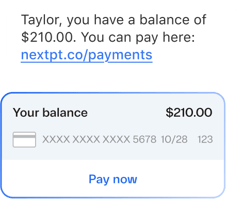
Patient balance text message with a Pay now card

Text-to-pay

A better way to collect payments

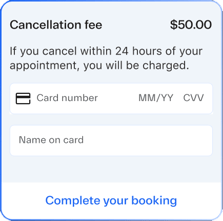
Card-on-file capture form with a cancellation fee

Card-on-file capture

Protect your schedule from late cancellations

Proof

Real results from real practices

23%

Of patients at Dawes Fretzin Dermatology pay within 24 hours.

30%

Of patients at Dawes Fretzin Dermatology pay within 10 days.

Chasing balances

Patients pay faster when paying is easy. Most billing workflows aren’t.

01

Statements patients never open

Statements go out once a month, by mail or through a portal patients never log into. Balances age, and staff end up on the phone collecting money that should have come in on its own.

02

Empty slots you can’t bill for

Without a card on file, a no-show or late cancellation costs you a slot you can’t bill for.

03

Every payment reconciled twice

When the payment tool sits on top of your PM system instead of inside it, your billing team reconciles every payment twice.

The result: Slower collections, more staff time spent chasing, and empty slots with nothing to show for them.

Collect at every step

One payments flow, from booking to balance

NextPatient connects to your Stripe or Square account, or NextechPay for Nextech practices, and collects when patients are already engaged: when they book online and when they get a text about what they owe.

Patient Self-Scheduling

Patients pay a fee or deposit and save a card as they book online

Payments

Patients get a secure link to pay by text as soon as their balance is ready

NextPatient

Payments

  • Booking fees and deposits
  • Card on file for no-shows
  • Text-to-pay balance links
  • Refunds and promo codes
  • Rules by visit reason

Your processor

  • Stripe or Square
  • NextechPay for Nextech practices
  • Money goes straight to your account

Your PM system

  • Booking payments post as a creditathenahealth, Nextech Select, DrChrono
  • Text-to-pay payments post backNextech Select, Nextech Practice+, ModMed

Payment feature availability depends on your practice management system and payment processor. Talk to a product expert to see exactly what’s available for your practice.

Why payments work better inside your scheduling platform

Collect while patients are engaged

Patients already book and get reminders through NextPatient. Paying is one more tap in the same flow, not a separate statement they have to go find.

No double entry

On supported PM systems, payments post to the patient's account automatically. Nextech Select practices can also filter the Payments Hub by "NextPatient" to see every transaction in one place.

Rules that match your visit types

Set payment requirements per visit reason, the same visit reasons that drive online booking. Require a card for high-value cosmetic consults and skip it for routine follow-ups.

The payments tool billing teams actually like

In the first 7 days of text-to-pay, the practice collected $7,500, and that is only counting payments that came in through the texts and emails! We have not only increased our income but also decreased expenses by lowering the cost of statements sent through our clearing house.

Focus Eye Group_Laura Spengler
Laura Spengler

Site Manager,
Focus Eye Group

This is the first billing cycle we have ever had that did not have any past-due notices. Practice leaders should not think twice about implementing text-to-pay — the business impact makes it a must-do.

Greensboro Dermatology Associates_Lisa White
Lisa White

Practice Administrator,
Greensboro Dermatology Associates

Frequently asked questions

Does NextPatient integrate payments with my practice management system?

Yes. Payments taken at online booking post automatically to athenahealth, Nextech Select, and DrChrono as an unapplied credit on the patient's account, so your billing team decides which balance it applies to. Booking payment push for Nextech Practice+ and AdvancedMD is in development. Text to Pay payments land in Nextech Select, Nextech Practice+, and ModMed, where they can apply automatically to the patient's oldest balance. On other systems, booking payments stay in your Stripe or Square dashboard for your team to reconcile.

Learn more: Set up payments at booking

See how patient payments work with your PM system

Book a 20-minute demo with a product expert. We’ll show you deposits, card on file, and text-to-pay running on your visit types.